
Location settings
Optional location sharing on the phone app: off, while clocked in, or on site during work hours. What each mode does, the notice people accept, and how to turn it on.
Operacora can show managers which building each person is in, or which named outdoor area. It is off until a top-level manager chooses a mode in Settings › Location and time clock, and nothing is shared for a person until they read and agree to your organization's notice in the phone app.
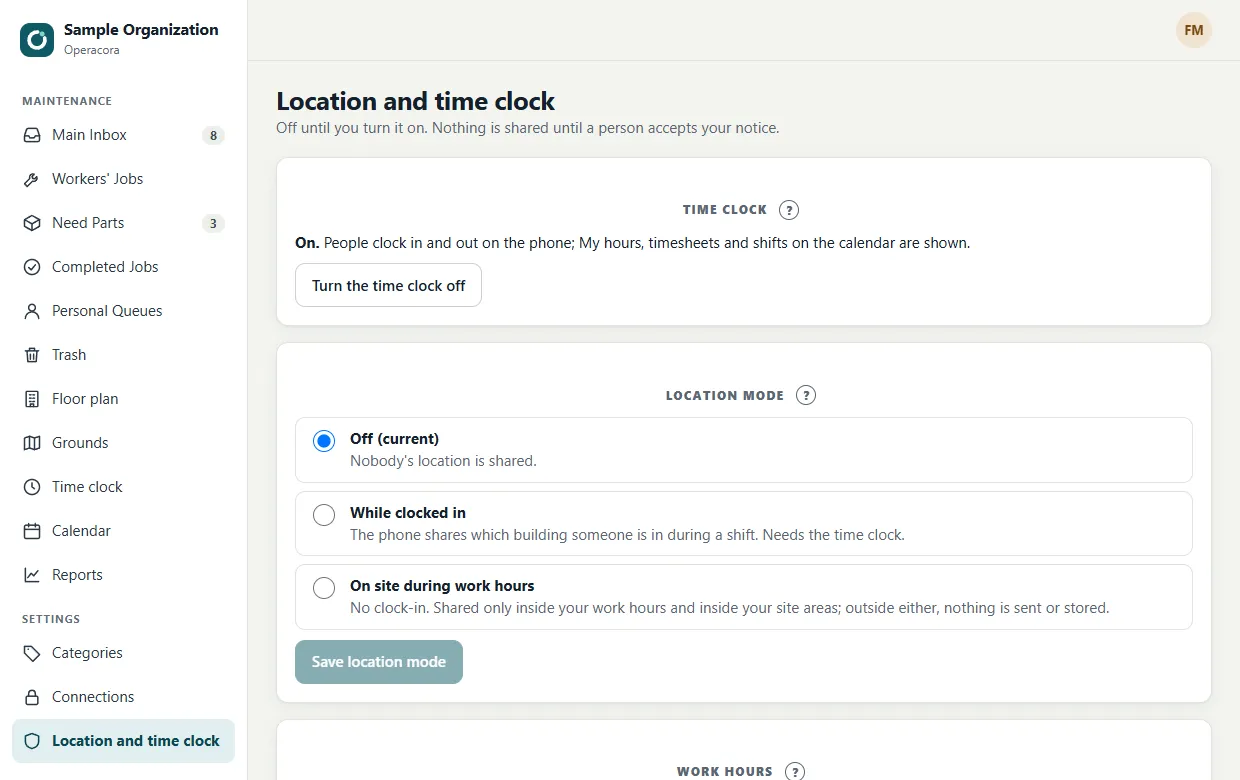
Before you turn location on: in some places, for example New York (Civil Rights Law §52-c), an employer must give written notice of electronic monitoring, get each employee's acknowledgment, and post the notice where employees can see it. Operacora shows your notice, links the Location and Monitoring Notice and records each agreement, but it can't tell you what the law requires where you are. Check with whoever handles HR or legal for your organization.
The three modes#
| Mode | When location is recorded |
|---|---|
| Off | Never. This is how every organization starts. |
| While clocked in | Only between clocking in and clocking out on the phone. Needs the time clock. |
| On site during work hours | No clock-in. Only inside your work hours and inside your site areas. See On site during work hours. |
In every mode#
| What happens | |
|---|---|
| Who agrees | Each person sees a consent screen in the phone app at their first sign-in: what is collected, why, who sees it, how long it is kept and how to stop, with a checkbox for the Terms of Use and the Location Notice. If they choose Not now, the app still works for their jobs and they show as "Location not shared". If you change the notice or the mode, everyone is asked again. Every agreement is kept with who, when, which version, and phone or web. |
| What is shared | Which building they are in (from the phone's location), or which named outdoor area. The room only when they scan a room code. |
| What is stored | The building, area or room and the time. Exact GPS coordinates are used to work this out and are not stored. |
| On the phone | Android shows a notification the whole time location sharing is running. |
| Stopping | Anyone can stop at any time in the phone app's Location settings. It takes effect at once. |
| How long it is kept | Location records are deleted automatically after the number of days you choose (30 by default). Time clock hours are kept. |
| Who sees it | Managers ranked above the person, on Where everyone is and the grounds map. Top-level managers also see, under Who has agreed, each person's status: names and status only, no places and no history. |
Turn it on#
- Set up building areas. Under Building areas, give each building a centre (search the address, press Use where I am, or type the latitude and longitude) and a Radius (m) that covers it. Press Save.
- For on site mode: set work hours and site areas first.
- Write your notice. Under Notice people accept, explain in plain words what you collect, when and why, and press Save notice. A built-in text that matches the mode is filled in for you.
- Choose how long to keep location records under Keep location records for.
- Choose the mode. Under Location mode, pick one, press Save location mode, read the reminder, and press I understand, turn on. Your notice is published to the phone app.
To stop, choose Off and save. Nobody's location is shared after that.
Room codes#
Buildings are as precise as GPS gets indoors: it tells the building, not the room. For room-level detail, print room codes: people scan them when they arrive in a room. Jobs also say which room the work is in. Scanning is always a deliberate action by the person.
Before wide use#
The Terms of Use, the Location and Monitoring Notice and your own notice are written in plain words, but they are not legal advice. Have them reviewed by someone who knows the rules where you operate before you turn location on for many people.