
Connections: your own provider accounts
Connect your organization's own accounts for maps, AI, voice, translation, texting and email. Keys are encrypted, free plans come first, and the providers bill you directly.
On this page
Some extras in Operacora run on outside services. Instead of reselling them, Operacora uses your organization's own account with each provider. You pay the provider directly, at their prices, with no markup, and you can see exactly what you use. Everything is optional: Operacora works without any of them.
Open Settings › Connections in the web app. Only top-level managers can see this page.
What works today#
| Connection | What it does now |
|---|---|
| Geoapify | Address search on the grounds map and for building areas. |
| MapTiler | Satellite imagery on the grounds map. |
| OpenRouter, Claude or OpenAI | A short title and tags for new reports, and AI room finding on plan pictures. See AI for how the model is chosen and what it costs. |
| Groq | Voice notes to text (the screens that record them are Coming). |
| Telnyx and Phone numbers | Texts to your numbers become jobs in each number's building. See Phone numbers. |
| Email intake | Emails forwarded to a building's intake address become jobs in that building. See Email intake. |
| Translation, sending email | You can save and test keys now. The features that use them (translation, sending email) are Coming. |
Set up a connection#
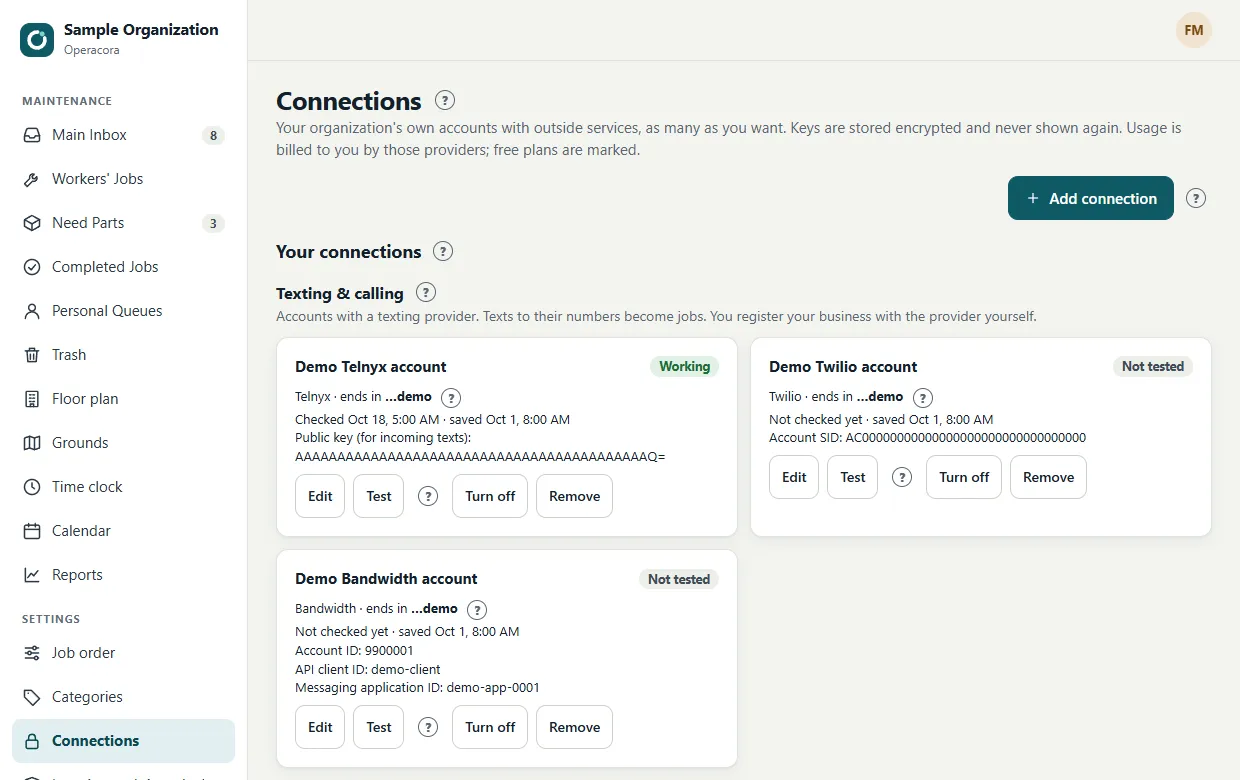
- Find the provider and press Get a key. The provider's own page opens, where you sign up or sign in and create a key.
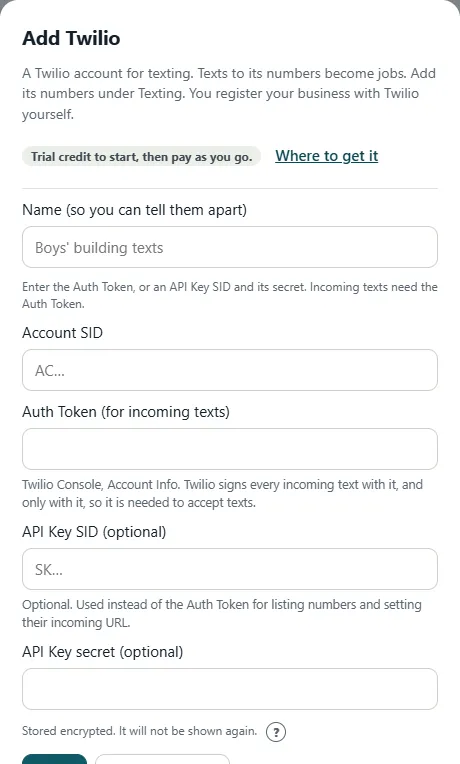
- Back in Operacora, press Set up, paste the key (and anything else the form asks for), and press Save.
- Press Test. Operacora makes one harmless, read-only request to the provider and shows Working or Not working.
After saving, the card shows the end of the key ("ends in 1a2b"), who saved it and when, and its status. To replace a key, press Change and paste the new one; leaving a key field empty keeps the saved one. Remove stops Operacora using it at once and deletes the saved key.
For email senders, inboxes and texting accounts you can add several (Add another), give each a name such as "Front office", and choose which one is the Default. Email senders and inboxes also have a building: emails about a job are sent from that building's sender, and jobs in a building without its own sender use the default.
Every provider#
Free plans change; the provider's own site is always the source of truth.
AI#
Optional help: a short title and tags for each new request, finding rooms on a plan, and more Coming. You do not choose a model: Operacora picks the cheapest one that does each task well, within a monthly limit you set. See AI. AI only ever suggests; people decide.
| Provider | Good for | Free plan | Where to get the key |
|---|---|---|---|
| OpenRouter | Many AI models through one account. Operacora picks the cheapest model that does each task well (see AI). | Some models are free. | openrouter.ai/keys |
| Claude (Anthropic) | Claude directly. Needs an API key from the Anthropic Console; a Claude.ai subscription can't be used by other apps. | None | console.anthropic.com |
| OpenAI | OpenAI's models; can also turn voice notes into text. | None | platform.openai.com/api-keys |
Voice#
Turns voice notes and voice search into text Coming.
| Provider | Good for | Free plan | Where to get the key |
|---|---|---|---|
| Groq | Very fast, low-cost speech to text. | With usage limits. | console.groq.com/keys |
| Deepgram | Speech to text that copes well with noisy places. | Starting credit. | console.deepgram.com |
Translation#
So each person reads messages and jobs in their own language Coming. Your AI connection can also translate, at no extra cost.
| Provider | Good for | Free plan | Where to get the key |
|---|---|---|---|
| DeepL | High-quality translation between English, Spanish, Hebrew and more. Free keys end in :fx. | 500,000 characters a month. | deepl.com |
Maps#
| Provider | Good for | Free plan | Where to get the key |
|---|---|---|---|
| Geoapify | Address search: type an address to find your site and buildings. | 3,000 requests a day. | myprojects.geoapify.com |
| MapTiler | Satellite imagery on the grounds map. | For small use. | cloud.maptiler.com |
Restrict your MapTiler key. Map imagery is loaded by each signed-in person's browser, so the key is visible to them. In MapTiler's dashboard, limit the key to app.operacora.com so nobody can use it elsewhere.
Texting & calling accounts#
Your account with a phone provider. You register your business with the provider yourself, in your own name, as carriers require. US registration can take days to weeks, so start early. The numbers themselves, as many as you need, each with its building, are listed under Phone numbers.
| Provider | You will need | Where to get it |
|---|---|---|
| Telnyx | API key, and the public key (Keys & Credentials › Public Key) so incoming texts can be checked. | portal.telnyx.com |
| Twilio | Account SID and auth token. | console.twilio.com |
| Bandwidth | Account ID, API username and password, messaging application ID. No Test button yet. | dashboard.bandwidth.com |
Email#
Senders for your organization's emails, such as invitations, receipts and alerts Coming, and inboxes to read, such as an orders mailbox Coming. Add as many senders as you need; one is the default.
| Provider | Good for | Free plan | Where to get the key |
|---|---|---|---|
| Resend | Sending from your own address. You verify your domain with Resend. | 3,000 emails a month. | resend.com/api-keys |
| Postmark | Sending, as an alternative to Resend. | 100 emails a month. | account.postmarkapp.com |
| Brevo | Sending, as another alternative. | 300 emails a day. | app.brevo.com |
| Email server (SMTP) | Sending through the email you already have: Google Workspace, Microsoft 365, Zoho and others. Use an app password, not your normal password. | Uses your existing account. | Google's SMTP guide, or your email provider's help |
| Orders mailbox (IMAP) | A shared, read-only mailbox for order and shipping emails. Use a dedicated mailbox and an app password. | Uses your existing account. | Google app passwords, or your email provider's help |
To turn emails into jobs, use Email intake: a private address per building that your mailbox forwards to. SMTP and IMAP have no Test button yet. Each person can also connect their own mailbox and sender under My connections.
How your keys are protected#
- Keys are write-only: once saved they are never shown again, never sent back to any browser, and never written to logs.
- They are encrypted before they are stored, and each one is locked to your organization, so a copied key can't be opened anywhere else.
- A test stores only "working" or "not working", not what the provider answered.
More in Privacy and security.